
Booking.com: Pay in your own currency
As a UX writing manager at Booking.com, traveller payments, my number one priority is to think customer first. From a content design perpsective, that means distilling complex products or features and distillling them down into easy to understand, human-centered experiences.
As a manager, my role requires me to navigate my team towards a larger goal, and a direction which puts content and users first.
In some cases however, the job requirements necessitate action on my end, and in these specific circumstances, I was able to work from an IC (individual contributor) perspective to flex my content design chops, which to be fair, need a bit of fine-tuning once in a while (it’s definitely not like riding a bike).
WHat is PIYOC?
PIYOC stands for “Pay in your own currency” and it’s a relatively new initiative at Booking to convert currency preferences for users, rather than have the issuing bank or credit card insititution charge foreign exchange fees. Typically, when you use your card to book overseas expenses, you incur a foreign transaction fee, which your bank/card company charges a nominal fee for.
At Booking, you can choose to have us charge these FX fees, which is often lower than the bank rate, as it’s based on the Central European Bank rate (plus a small fee on top).
Whether the user chooses PIYOC or not is still up to them, but with these feature they have more control, transparency, and choice for which currency and FX rate they’d like to choose.
How we write for PIYOC
Writing content in this area is complex, often requiring close collaobration with legal and compliance stakeholders. From a content design perspective, we’re constantly managing the balance between legal compliance and friendly, intuitive language that users can easily understand.
In this case, the traveller is making a prepayment (paying in advance), which means that by selecting our PIYOC option, their actual FX rate can change by the time they’re charged, as the rate changes daily based on the current market rate.

2 PIYOC projects:
In this section, I’d like to present you with 2 separate projects related to the PIYOC feature which I worked directly on.
PIYOC FAQ
Upcoming charge email
PIYOC FAQ
To provide a better level of transparency and explanation for how PIYOC works, the product team suggested linking an FAQ document or help text, to properly explain to users questions they have about FX charges or bank rates. The hypothesis was that by giving users more awareness of the feature and how it worked, it would increase overall usage and conversion to Booking’s PIYOC offering.
At the time, the team didn’t have a content designer to support the feature, so they tried to launch it with an early exploration they had, and this was how it looked:
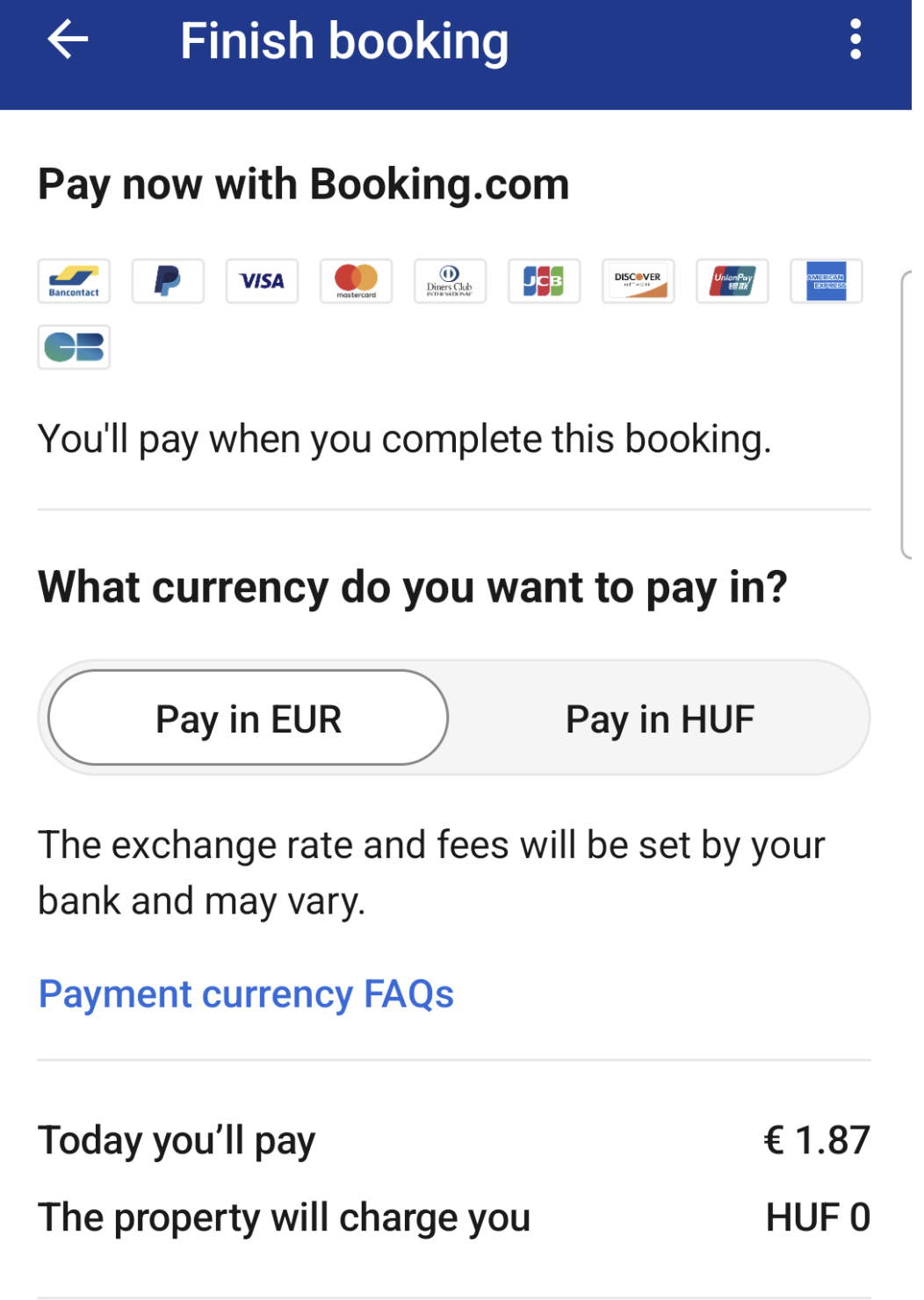
Note the big blue hyperlink
The result? The FAQ did not test well, and even lowered overall PIYOC conversions.
Why? Initial feedback seemed to indicate a problem with the discovery, as well as general non-interest into what the link contained. It makes sense, why as a user, would I care about payment currencies when all I want to do is book my reservation?
My Proposal
I knew there was a good opportunity here to raise user awareness about the benefit of PIYOC, while gaining a deeper understanding of why users should care in the first place. After some ideations, and using crit reviews to refine the content, here are the explorations of what I had propsed to the product team:
Here’s a closer look at the revised content:
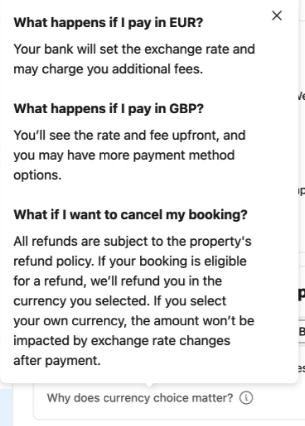
One of the biggest changes I proposed was a change of the link itself from “Payment currency FAQs” to “Why does currency choice matter?”
This small but mighty change led to a large increase in help text views, plus increased our overall PIYOC conversions.
The experiment led to an increas of +680 additional users per day selecting PIYOC/conversions, which was an increase of 2.98% over the base.
Conclusion: Our users don’t care so much about the feature, but are interested if it helps them save some money. They like convenience, transparency, and choice, and by taking an approach of providing factual information combined with direct, no-frills/upsell language, we put users first by communicating what really matters to them.
Project 2: Upcoming email charge
Emails can be confusing. In this case, we’re required to send an email upfront to users before their charge, in case they’d like to change the payment details, or take other action. It’s quite common at Booking for users to book their travel plans a long time in advance, which often means they forget about these large transactions by the time the date comes due.
This email is set to remind them about the charge, while also conveying the fact that the exact amount might charge slightly due to FX rate fluctuations, which we legally must provide (even if the final amount is a penny difference).
Here' was the initial email, which user feedback indicated that many found confusing:
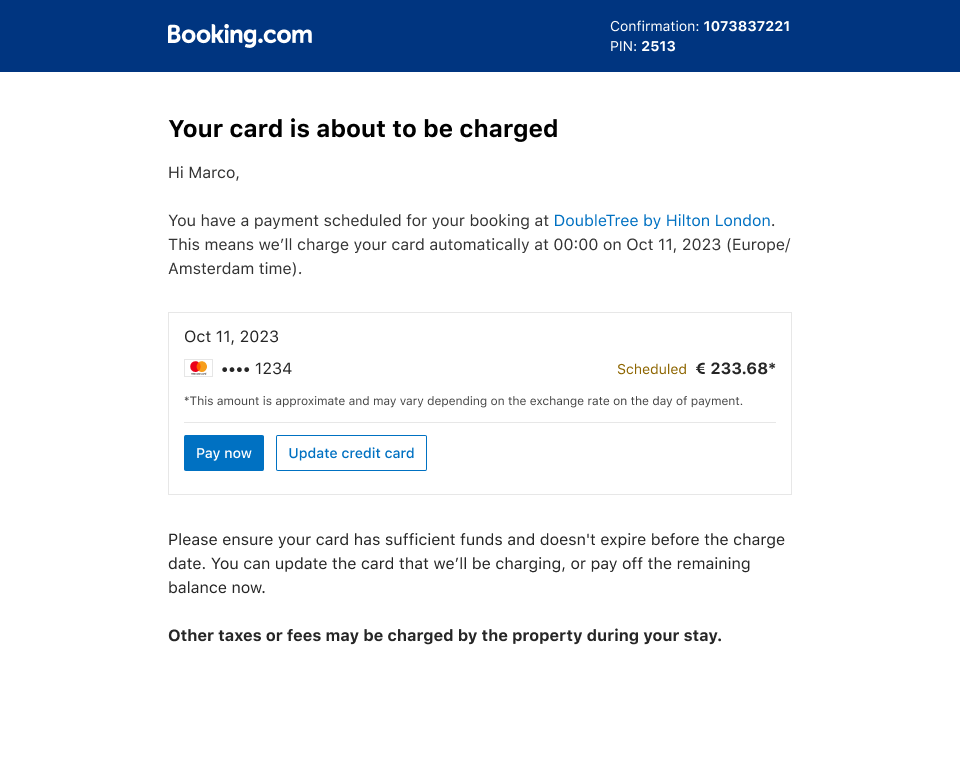
Questions and thoughts I considered
The tone is cold, not conversational, and not human.
Your card is about to be charged sounds very definitive, and I’m not sure how that timing works out. What if I opened this later, or the next day, it wouldn’t make much sense would it?
What I wanted to cancel, or make changes to my reservation? How would I do that?
If the amount could change, why am I seeing it now?
Do I really need to be told to have sufficient funds, or make sure my card doesn’t expire?
What is the “remaining balance”? Does this mean I’ve made a previous payment?
My copy approach

Rationale
Create a warm, human, and conversational tone inline with Booking.com’s values
Give the user a link to manage their booking to change. or cancel their reservation if needed
Remove any unnecessary language or clutter to make sure the core of the message, that we’ll automatically charge the card, is conveyed and understood
Set aside any anxieties for the user by assuring them they don’t have to take any action, and that we’ll confirm the payment once it goes through
For the amount that will change, I pushed to the team to remove the amount and simply let the user know about the automatic charge to avoid confusion. After all, if the amount is going to potentially change, than what good does showing the amount do?
But there were certain legal reasons they wanted to keep it in, so I had to compromise.
Result
At the end of the day, I was successfully able to navigate the content-getting buy off from both legal and product teams. The email is now in production and while I don’t have performance metrics, the product and legal teams are all happy with the changes we’ve made.